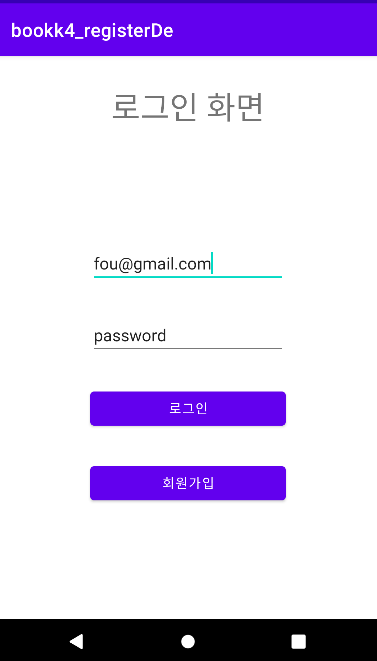
이 포스팅은 https://seopseop911.tistory.com/30 을 참고 했습니다 (백업본)
AWS EC2 인스턴스 생성, 접속, MySQL 설치, Apache, PHP 연동한다
https://code-onetool.tistory.com/20
https://code-onetool.tistory.com/12
AWS EC2 인스턴스 생성, 접속, MySQL 설치, Apache, PHP 연동하는 법 오류 정리
AWS EC2 인스턴스 생성, 접속, MySQL 설치, Apache, PHP 연동하는 법 AWS EC2 인스턴스 생성, 접속, MySQL 설치, Apache, PHP 연동 [한 번에 끝내기] AWS EC2 인스턴스를 생성한 뒤에, 거기에 접속해서 MySQL, Apache, PHP
code-onetool.tistory.com
아래에 것을 순서대로 입력하여 접속, 데이터베이스 만들고 table 구성을 한다.
sudo mysql -u root -pEnter password: 비밀번호 입력.
mysql> CREATE DATABASE bbs;mysql> USE bbs;
CREATE TABLE `users` (
  `idx` int NOT NULL AUTO_INCREMENT,
  `userEmail` varchar(255) NOT NULL,
  `userNick` varchar(255) NOT NULL,
  `userPassword` varchar(255) NOT NULL,
  PRIMARY KEY (`idx`),
  UNIQUE KEY `email_UNIQUE` (`userEmail`)
) ENGINE=InnoDB AUTO_INCREMENT=45 DEFAULT CHARSET=utf8mb4 COLLATE=utf8mb4_0900_ai_ci
mysql> desc users;위의 코드를 이용하여 users라는 table에 구성을 확인할 수 있다.
아래와 같다.
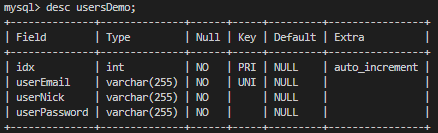
그렇다면 이제 database의 table 구성은 끝이났고, 데이터 입력은 앱에서 회원가입을 통해 입력받을 것이다.
database = bbs
table = users
MySQL과 Android를 연결해 줄 PHP 파일을 작성해 줄 것이다. 코드는 다음과 같다.
< zloginDemo.php >
< zRegisterDemo.php >
이제는 앱을 만들어 볼 것이다. Android Studio를 켜고
Gradle Scripts -> build gradle (module: app)에서 dependencies 안에 아래의 것을 추가 해준다.
| com.android.volley:volley:1.1.1' |
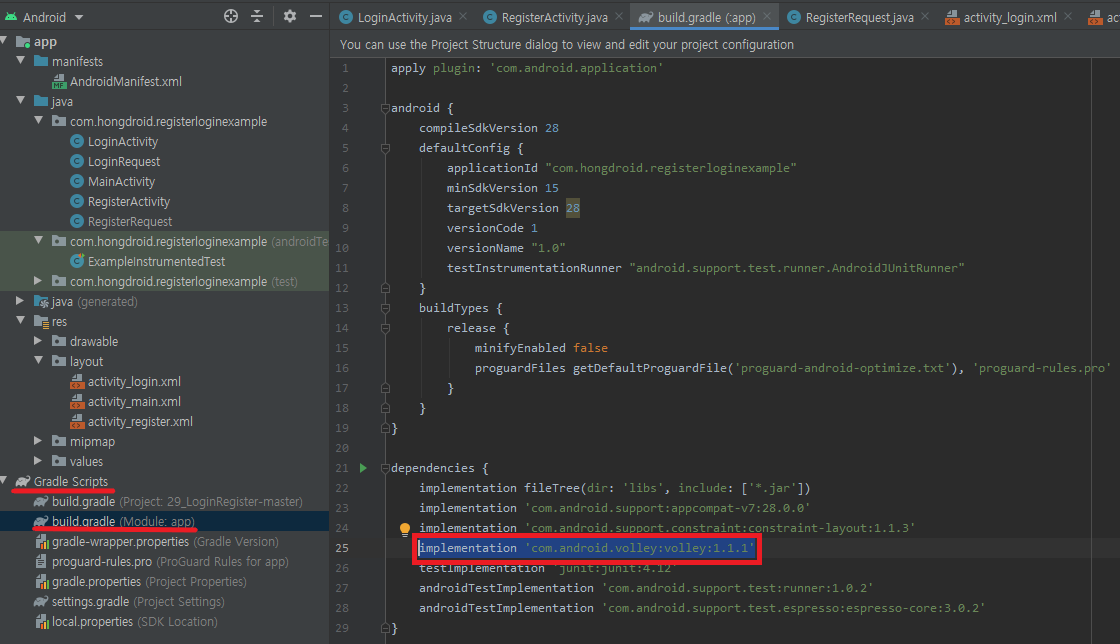
이제 다음 코드에 맞게 이용
< AndroidManifest.xml >
아래의 두 줄 추가.
| <uses-permission android:name="android.permission.INTERNET" /> android:usesCleartextTraffic="true"> |
<?xml version="1.0" encoding="utf-8"?>
<manifest xmlns:android="http://schemas.android.com/apk/res/android"
    package="com.hongdroid.registerloginexample">


    <uses-permission android:name="android.permission.INTERNET" /> <!-- 인터넷 권한 선언-->

    <application
        android:allowBackup="true"
        android:icon="@mipmap/ic_launcher"
        android:label="@string/app_name"
        android:roundIcon="@mipmap/ic_launcher_round"
        android:supportsRtl="true"
        android:theme="@style/AppTheme"
        android:usesCleartextTraffic="true">

        <activity android:name=".LoginActivity">
            <intent-filter>
                <action android:name="android.intent.action.MAIN" />

                <category android:name="android.intent.category.LAUNCHER" />
            </intent-filter>
        </activity>
        <activity android:name=".RegisterActivity" />
        <activity android:name=".MainActivity">

        </activity>
    </application>

</manifest>
< LoginActivity.java >
//LoginActivity라는 클래스가 AppCompatActivity를 상속받아 로그인 화면을 구성하고 있다
// onCreate 메소드 안에서는 레이아웃을 설정하고, 각 버튼의 클릭 이벤트를 처리하고 있습니다. 회원가입 버튼을 누르면 RegisterActivity로 이동하고,
// 로그인 버튼을 누르면 입력된 아이디와 비밀번호를 서버에 전송하여 로그인 요청
public class LoginActivity extends AppCompatActivity {

    // UI 요소를 위한 변수 선언
    private EditText et_email, et_pass;
    private Button btn_login, btn_register;

    @Override
    protected void onCreate(Bundle savedInstanceState) {
        super.onCreate(savedInstanceState);
        setContentView(R.layout.activity_login);

        // UI 요소와 변수 연결
        et_email = findViewById(R.id.et_email);
        et_pass = findViewById(R.id.et_pass);
        btn_login = findViewById(R.id.btn_login);
        btn_register = findViewById(R.id.btn_register);


        // 회원가입 버튼 클릭 시 RegisterActivity로 이동
        btn_register.setOnClickListener(new View.OnClickListener() {
            @Override
            public void onClick(View view) {
                Intent intent = new Intent(LoginActivity.this, login_emailok.class);
                startActivity(intent);
            }
        });

        // 로그인 버튼 클릭 시 수행되는 동작 정의
        btn_login.setOnClickListener(new View.OnClickListener() {
            @Override
            public void onClick(View view) {
                // EditText에 현재 입력되어있는 값을 get(가져온다)해온다.
                String userEmail = et_email.getText().toString();
                String userPass = et_pass.getText().toString();

                // 서버로부터 응답을 받아 처리하는 리스너 정의
                Response.Listener<String> responseListener = new Response.Listener<String>() {
                    @Override
                    public void onResponse(String response) {
                        try {
                            // TODO : 인코딩 문제때문에 한글 DB인 경우 로그인 불가
                            System.out.println("hongchul : " + response);

                            JSONObject jsonObject = new JSONObject(response);
                            boolean success = jsonObject.getBoolean("success");
                            if (success) {  // 로그인 성공 시
                                String userEmail = jsonObject.getString("userEmail");
                                String userPass = jsonObject.getString("userPassword");

                                Toast.makeText(getApplicationContext(),"로그인에 성공하였습니다.",Toast.LENGTH_SHORT).show();
                                Intent intent = new Intent(LoginActivity.this, MainActivity.class);
                                intent.putExtra("userEmail", userEmail);
                                intent.putExtra("userPass", userPass);
                                startActivity(intent);
                            } else {  // 로그인 실패 시
                                Toast.makeText(getApplicationContext(),"로그인에 실패하였습니다.",Toast.LENGTH_SHORT).show();
                                return;
                            }
                        } catch (JSONException e) {
                            e.printStackTrace();
                        }
                    }
                };

                // 로그인 요청을 서버에 전송
                LoginRequest loginRequest = new LoginRequest(userEmail, userPass, responseListener);
                RequestQueue queue = Volley.newRequestQueue(LoginActivity.this);
                queue.add(loginRequest);
            }
        });


    }
}
< LoginRequest.java >
//LoginRequest라는 클래스가 StringRequest를 상속받아 로그인 요청을 처리한다
// 생성자에서는 사용자 아이디와 비밀번호를 받아 HashMap에 저장하고 있다 getParams 메소드에서는 이 HashMap을 반환하여 서버에 데이터를 전송한다
public class LoginRequest extends StringRequest {

    // 서버 URL 설정 ( PHP 파일 연동 )
    final static private String URL = "http://3.34.5.186/zloginDemo.php";
    private Map<String, String> map;

    // 로그인 요청을 위한 생성자
    public LoginRequest(String userEmail, String userPassword, Response.Listener<String> listener) {
        super(Method.POST, URL, listener, null);

        // HashMap을 이용해 userID와 userPassword를 저장
        map = new HashMap<>();
        map.put("userEmail",userEmail);
        map.put("userPassword", userPassword);

    }

    // 서버에 데이터를 전송할 때 호출되는 메소드
    @Override
    protected Map<String, String> getParams() throws AuthFailureError {
        return map;
    }
}
< MainActivity.java >
public class MainActivity extends AppCompatActivity {

    private TextView tv_email, tv_pass;

    @Override
    protected void onCreate(Bundle savedInstanceState) {
        super.onCreate(savedInstanceState);
        setContentView(R.layout.activity_main);

        tv_email = findViewById(R.id.tv_email);
        tv_pass = findViewById(R.id.tv_pass);


        Intent intent = getIntent();
        String userEmail = intent.getStringExtra("userEmail");
        String userPass = intent.getStringExtra("userPass");

        tv_email.setText(userEmail);
        tv_pass.setText(userPass);
    }
}
< RegisterActivity.java >
//RegisterActivity라는 클래스가 AppCompatActivity를 상속받아 회원가입 화면을 구성하고 있습니다.
// onCreate 메소드 안에서는 레이아웃을 설정하고, 회원가입 버튼의 클릭 이벤트를 처리하고 있습니다.
// 버튼을 누르면 입력된 사용자 정보를 서버에 전송하여 회원가입 요청을 합니다.
public class RegisterActivity extends AppCompatActivity {
    private static final String TAG = "RegisterActivity";

    // UI 요소를 위한 변수 선언
    private EditText et_nick, et_pass, et_name, et_confirm_pass;
    private TextView tv_verifiedEmail;
    private Button btn_register;

    @Override
    protected void onCreate(Bundle savedInstanceState) { // 액티비티 시작시 처음으로 실행되는 생명주기!
        super.onCreate(savedInstanceState);
        setContentView(R.layout.activity_register);

        // UI 요소와 변수 연결
        et_nick = findViewById(R.id.et_nick);
        et_pass = findViewById(R.id.et_pass);
        tv_verifiedEmail = findViewById(R.id.tv_verifiedEmail);
        et_confirm_pass = findViewById(R.id.et_confirm_pass);

        String verifiedEmail = getIntent().getStringExtra("VerifiedEmail");
//                        Log.v(TAG ,"login_register - " + "Verified Email : " + verifiedEmail);
        tv_verifiedEmail.setText(verifiedEmail);


        // 회원가입 버튼 클릭 시 수행되는 동작 정의
        btn_register = findViewById(R.id.btn_register);
        btn_register.setOnClickListener(new View.OnClickListener() {
            @Override
            public void onClick(View view) {
                // EditText에 현재 입력되어있는 값을 get(가져온다)해온다.
                String userEmail = tv_verifiedEmail.getText().toString();
                String userNick = et_nick.getText().toString();
                String userPass = et_pass.getText().toString();
                String confirmPass = et_confirm_pass.getText().toString(); // Add this line for confirmation

                Log.v(TAG ,"onClick : " + "userEmail : " + userEmail);
                Log.v(TAG ,"onClick : " + "userNick : " + userNick);
                Log.v(TAG ,"onClick : " + "userPassword : " + userPass);
//                String userName = et_name.getText().toString();
//                int userAge = Integer.parseInt(et_confirm_pass.getText().toString());

                // 비밀번호와 확인 비밀번호가 일치하는지 확인합니다.
                if (!userPass.equals(confirmPass)) {
                    Toast.makeText(getApplicationContext(), "비밀번호와 확인 비밀번호가 일치하지 않습니다.", Toast.LENGTH_SHORT).show();
                    return; // 비밀번호가 일치하지 않으면 메서드를 종료합니다.
                }

                // 서버로부터 응답을 받아 처리하는 리스너 정의
                Response.Listener<String> responseListener = new Response.Listener<String>() {
                    @Override
                    public void onResponse(String response) {

                        try {
                            JSONObject jsonObject = new JSONObject(response);
                            boolean success = jsonObject.getBoolean("success");
                            if (success) { // 회원등록에 성공 시
                                Toast.makeText(getApplicationContext(),"회원 등록에 성공하였습니다.",Toast.LENGTH_SHORT).show();
                                Log.v(TAG ,"onResponse : " + "jsonObject : " + jsonObject);

                                Intent intent = new Intent(RegisterActivity.this, LoginActivity.class);
                                startActivity(intent);
                            } else { // 회원등록에 실패 시
                                Toast.makeText(getApplicationContext(),"회원 등록에 실패하였습니다.",Toast.LENGTH_SHORT).show();
                                return;
                            }
                        } catch (JSONException e) {
                            e.printStackTrace();
                        }

                    }
                };
                //회원가입 요청을 서버에 서버로 Volley를 이용해서 요청을 함.
                RegisterRequest registerRequest = new RegisterRequest( userEmail ,userNick,userPass, responseListener);
                RequestQueue queue = Volley.newRequestQueue(RegisterActivity.this);
                queue.add(registerRequest);

                Log.v(TAG ,"registerRequest : " + "userEmail : " + userEmail);
                Log.v(TAG ,"registerRequest : " + "userNick : " + userNick);
                Log.v(TAG ,"registerRequest : " + "userPass : " + userPass);
                Log.v(TAG ,"registerRequest : " + "registerRequest : " + registerRequest);
                Log.v(TAG ,"registerRequest : " + "queue : " + queue);

            }
        });

    }
}
< RegisterRequest.java >
//RegisterRequest라는 클래스가 StringRequest를 상속받아 회원가입 요청을 처리하고 있습니다.
// 생성자에서는 사용자 아이디, 비밀번호, 이름, 나이를 받아 HashMap에 저장하고 있습니다.
// getParams 메소드에서는 이 HashMap을 반환하여 서버에 데이터를 전송합니다.
public class RegisterRequest extends StringRequest {
    private static final String TAG = "RegisterRequest";

    // 서버 URL 설정 ( PHP 파일 연동 )
    final static private String URL = "http://3.34.5.186/zRegisterDemo.php";
    private Map<String, String> map;

    // 회원가입 요청을 위한 생성자
    public RegisterRequest(String userEmail, String userNick, String userPassword,  Response.Listener<String> listener) {
        super(Method.POST, URL, listener, null);

        // HashMap을 이용해 사용자 정보를 저장
        map = new HashMap<>();
        map.put("userEmail", userEmail);
        map.put("userNick",userNick);
        map.put("userPassword", userPassword);
//        map.put("userAge", userAge + "");
                Log.v(TAG ,"RegisterRequest - " + "userEmail : " + userEmail);
                Log.v(TAG ,"RegisterRequest - " + "userNick : " + userNick);
                Log.v(TAG ,"RegisterRequest - " + "userPassword : " + userPassword);

    }

    // 서버에 데이터를 전송할 때 호출되는 메소드
    @Override
    protected Map<String, String> getParams() throws AuthFailureError {
        return map;
    }
}
< activity_login.xml >
<?xml version="1.0" encoding="utf-8"?>
<androidx.constraintlayout.widget.ConstraintLayout xmlns:android="http://schemas.android.com/apk/res/android"
    xmlns:app="http://schemas.android.com/apk/res-auto"
    xmlns:tools="http://schemas.android.com/tools"
    android:layout_width="match_parent"
    android:layout_height="match_parent"
    tools:context=".LoginActivity">

    <TextView
        android:id="@+id/textView17"
        android:layout_width="wrap_content"
        android:layout_height="wrap_content"
        android:layout_marginStart="143dp"
        android:layout_marginTop="32dp"
        android:layout_marginEnd="143dp"
        android:gravity="center"
        android:text="로그인 화면"
        android:textSize="34sp"
        app:layout_constraintEnd_toEndOf="parent"
        app:layout_constraintStart_toStartOf="parent"
        app:layout_constraintTop_toTopOf="parent" />


    <EditText
        android:id="@+id/et_email"
        android:layout_width="wrap_content"
        android:layout_height="wrap_content"
        android:layout_marginStart="8dp"
        android:layout_marginTop="200dp"
        android:layout_marginEnd="8dp"
        android:ems="10"
        android:hint="이메일"
        android:inputType="textPersonName"
        app:layout_constraintEnd_toEndOf="parent"
        app:layout_constraintStart_toStartOf="parent"
        app:layout_constraintTop_toTopOf="parent" />

    <EditText
        android:id="@+id/et_pass"
        android:layout_width="wrap_content"
        android:layout_height="wrap_content"
        android:layout_marginStart="8dp"
        android:layout_marginLeft="8dp"
        android:layout_marginTop="32dp"
        android:layout_marginEnd="8dp"
        android:layout_marginRight="8dp"
        android:ems="10"
        android:hint="비밀번호"
        android:inputType="textPersonName"
        app:layout_constraintEnd_toEndOf="@+id/et_email"
        app:layout_constraintStart_toStartOf="@+id/et_email"
        app:layout_constraintTop_toBottomOf="@+id/et_email" />

    <Button
        android:id="@+id/btn_login"
        android:layout_width="0dp"
        android:layout_height="wrap_content"
        android:layout_marginTop="32dp"
        android:text="로그인"
        app:layout_constraintEnd_toEndOf="@+id/et_pass"
        app:layout_constraintStart_toStartOf="@+id/et_pass"
        app:layout_constraintTop_toBottomOf="@+id/et_pass" />

    <Button
        android:id="@+id/btn_register"
        android:layout_width="0dp"
        android:layout_height="wrap_content"
        android:layout_marginTop="32dp"
        android:text="회원가입"
        app:layout_constraintEnd_toEndOf="@+id/btn_login"
        app:layout_constraintStart_toStartOf="@+id/btn_login"
        app:layout_constraintTop_toBottomOf="@+id/btn_login" />
</androidx.constraintlayout.widget.ConstraintLayout>
< activity_main.xml >
<?xml version="1.0" encoding="utf-8"?>
<androidx.constraintlayout.widget.ConstraintLayout
    xmlns:android="http://schemas.android.com/apk/res/android"
    xmlns:tools="http://schemas.android.com/tools"
    xmlns:app="http://schemas.android.com/apk/res-auto"
    android:layout_width="match_parent"
    android:layout_height="match_parent"
    tools:context=".MainActivity">


    <TextView
        android:id="@+id/textView17"
        android:layout_width="wrap_content"
        android:layout_height="wrap_content"
        android:layout_marginStart="143dp"
        android:layout_marginTop="32dp"
        android:layout_marginEnd="143dp"
        android:gravity="center"
        android:text="로그인 완료!"
        android:textSize="34sp"
        app:layout_constraintEnd_toEndOf="parent"
        app:layout_constraintStart_toStartOf="parent"
        app:layout_constraintTop_toTopOf="parent" />

    <TextView
        android:id="@+id/textView5"
        android:layout_width="wrap_content"
        android:layout_height="wrap_content"
        android:layout_marginTop="100dp"
        android:text="Hello World!"
        android:textSize="30sp"
        app:layout_constraintLeft_toLeftOf="parent"
        app:layout_constraintRight_toRightOf="parent"
        app:layout_constraintTop_toTopOf="parent" />

    <TextView
        android:id="@+id/textView"
        android:layout_width="wrap_content"
        android:layout_height="wrap_content"
        android:layout_marginStart="8dp"
        android:layout_marginLeft="8dp"
        android:layout_marginTop="8dp"
        android:layout_marginEnd="8dp"
        android:layout_marginRight="8dp"
        android:text="이메일"
        android:textSize="24sp"
        app:layout_constraintEnd_toEndOf="parent"
        app:layout_constraintStart_toStartOf="parent"
        app:layout_constraintTop_toBottomOf="@+id/textView5" />

    <TextView
        android:id="@+id/tv_email"
        android:layout_width="wrap_content"
        android:layout_height="wrap_content"
        android:layout_marginStart="8dp"
        android:layout_marginLeft="8dp"
        android:layout_marginTop="8dp"
        android:layout_marginEnd="8dp"
        android:layout_marginRight="8dp"
        android:text="TextView"
        android:textSize="30sp"
        app:layout_constraintEnd_toEndOf="parent"
        app:layout_constraintStart_toStartOf="parent"
        app:layout_constraintTop_toBottomOf="@+id/textView" />

    <TextView
        android:id="@+id/textView3"
        android:layout_width="wrap_content"
        android:layout_height="wrap_content"
        android:layout_marginStart="8dp"
        android:layout_marginLeft="8dp"
        android:layout_marginTop="8dp"
        android:layout_marginEnd="8dp"
        android:layout_marginRight="8dp"
        android:text="비밀번호"
        android:textSize="24sp"
        app:layout_constraintEnd_toEndOf="parent"
        app:layout_constraintStart_toStartOf="parent"
        app:layout_constraintTop_toBottomOf="@+id/tv_email" />

    <TextView
        android:id="@+id/tv_pass"
        android:layout_width="wrap_content"
        android:layout_height="wrap_content"
        android:layout_marginStart="8dp"
        android:layout_marginLeft="8dp"
        android:layout_marginTop="8dp"
        android:layout_marginEnd="8dp"
        android:layout_marginRight="8dp"
        android:text="TextView"
        android:textSize="30sp"
        app:layout_constraintEnd_toEndOf="parent"
        app:layout_constraintStart_toStartOf="parent"
        app:layout_constraintTop_toBottomOf="@+id/textView3" />

</androidx.constraintlayout.widget.ConstraintLayout>
< activity_register.xml >
<?xml version="1.0" encoding="utf-8"?>
<androidx.constraintlayout.widget.ConstraintLayout xmlns:android="http://schemas.android.com/apk/res/android"
    xmlns:app="http://schemas.android.com/apk/res-auto"
    xmlns:tools="http://schemas.android.com/tools"
    android:layout_width="match_parent"
    android:layout_height="match_parent"
    tools:context=".RegisterActivity">


    <TextView
        android:id="@+id/textView17"
        android:layout_width="wrap_content"
        android:layout_height="wrap_content"
        android:layout_marginStart="143dp"
        android:layout_marginTop="32dp"
        android:layout_marginEnd="143dp"
        android:gravity="center"
        android:text="가입하기"
        android:textSize="34sp"
        app:layout_constraintEnd_toEndOf="parent"
        app:layout_constraintStart_toStartOf="parent"
        app:layout_constraintTop_toTopOf="parent" />


    <TextView
        android:id="@+id/textView"
        android:layout_width="wrap_content"
        android:layout_height="wrap_content"
        android:layout_marginStart="100dp"
        android:layout_marginTop="70dp"
        android:layout_marginBottom="32dp"
        android:text="이메일 : "
        android:textColor="#FF0000"
        app:layout_constraintBottom_toTopOf="@+id/et_nick"
        app:layout_constraintStart_toStartOf="parent"
        app:layout_constraintTop_toBottomOf="@+id/textView17" />

    <TextView
        android:id="@+id/tv_verifiedEmail"
        android:layout_width="wrap_content"
        android:layout_height="wrap_content"
        android:layout_marginStart="10dp"
        android:layout_marginTop="70dp"
        android:layout_marginBottom="32dp"
        android:text="이메일 확인 "
        android:textColor="#FF0000"
        app:layout_constraintStart_toEndOf="@+id/textView"
        app:layout_constraintTop_toBottomOf="@+id/textView17" />

    <EditText
        android:id="@+id/et_nick"
        android:layout_width="wrap_content"
        android:layout_height="wrap_content"
        android:layout_marginStart="8dp"
        android:layout_marginLeft="8dp"
        android:layout_marginTop="200dp"
        android:layout_marginEnd="8dp"
        android:layout_marginRight="8dp"
        android:ems="10"
        android:hint="닉네임"
        android:inputType="textPersonName"
        app:layout_constraintEnd_toEndOf="parent"
        app:layout_constraintStart_toStartOf="parent"
        app:layout_constraintTop_toTopOf="parent" />

    <EditText
        android:id="@+id/et_pass"
        android:layout_width="wrap_content"
        android:layout_height="wrap_content"
        android:layout_marginTop="16dp"
        android:ems="10"
        android:hint="비밀번호"
        android:inputType="textPersonName"
        app:layout_constraintEnd_toEndOf="@+id/et_nick"
        app:layout_constraintStart_toStartOf="@+id/et_nick"
        app:layout_constraintTop_toBottomOf="@+id/et_nick" />

    <EditText
        android:id="@+id/et_confirm_pass"
        android:layout_width="wrap_content"
        android:layout_height="wrap_content"
        android:layout_marginTop="16dp"
        android:ems="10"
        android:hint="비밀번호 확인"
        android:inputType="textPassword"
        app:layout_constraintEnd_toEndOf="@+id/et_pass"
        app:layout_constraintStart_toStartOf="@+id/et_pass"
        app:layout_constraintTop_toBottomOf="@+id/et_pass" />

    <Button
        android:id="@+id/btn_register"
        android:layout_width="210dp"
        android:layout_height="wrap_content"
        android:layout_marginTop="32dp"
        android:text="회원가입"
        app:layout_constraintEnd_toEndOf="@+id/et_confirm_pass"
        app:layout_constraintHorizontal_bias="0.0"
        app:layout_constraintStart_toStartOf="@+id/et_confirm_pass"
        app:layout_constraintTop_toBottomOf="@+id/et_confirm_pass" />

    <TextView
        android:id="@+id/tv_password_match_status"
        android:layout_width="wrap_content"
        android:layout_height="wrap_content"
        android:layout_marginTop="10dp"
        android:text="-"
        android:textColor="#FF0000"
        app:layout_constraintEnd_toEndOf="@+id/et_confirm_pass"
        app:layout_constraintHorizontal_bias="0.496"
        app:layout_constraintStart_toStartOf="@+id/et_confirm_pass"
        app:layout_constraintTop_toBottomOf="@+id/et_confirm_pass" />
</androidx.constraintlayout.widget.ConstraintLayout>
< login_emailok.java >
public class login_emailok extends AppCompatActivity {

    EditText editTextInputEmailAddress  ;   //이메일 입력 , 인증번호 입력
    Button  nextButton ;        //인증번호 발송 , 다음으로 , 인증번호 확인
    String text ;


    @Override
    protected void onCreate(Bundle savedInstanceState) {
        super.onCreate(savedInstanceState);
        setContentView(R.layout.login_emailok);


        editTextInputEmailAddress = (EditText) findViewById(R.id.editTextInputEmailAddress);  //이메일 입력
        nextButton = (Button) findViewById(R.id.nextButton);        //다음으로


// 다음으로 버튼의 클릭 이벤트 등록
        nextButton.setOnClickListener(new View.OnClickListener() {
            @Override
            public void onClick(View v) {
                text = editTextInputEmailAddress.getText().toString();      //text : fougisa1042@gmail.com


                String email = editTextInputEmailAddress.getText().toString().trim();

                // 이메일 유효성 검사
                if (TextUtils.isEmpty(email) || !Patterns.EMAIL_ADDRESS.matcher(email).matches()) {
                    // 이메일이 유효하지 않은 경우 에러 메시지 표시
                    editTextInputEmailAddress.setError("올바른 이메일 주소를 입력하세요");
                    return;
                }

                // 사용자에게 이메일 확인 중임을 알리는 토스트 메시지 표시
                Toast.makeText(login_emailok.this, "이메일 확인 중...", Toast.LENGTH_SHORT).show();

                // 이메일 확인이나 다음 액티비티로 이동
                text = email;
                Intent intent = new Intent(login_emailok.this, RegisterActivity.class);
                intent.putExtra("VerifiedEmail", text);      //text : fougisa1042@gmail.com
//                Log.v(TAG ,"onVerificationSuccess - " + "text2 : " + text);

                startActivity(intent);
            }
        });


    }
}
< login_emailok.xml >
<?xml version="1.0" encoding="utf-8"?>
<androidx.constraintlayout.widget.ConstraintLayout xmlns:android="http://schemas.android.com/apk/res/android"
    xmlns:app="http://schemas.android.com/apk/res-auto"
    xmlns:tools="http://schemas.android.com/tools"
    android:layout_width="match_parent"
    android:layout_height="match_parent"
    tools:context=".login_emailok">\

    <TextView
        android:id="@+id/textView15"
        android:layout_width="wrap_content"
        android:layout_height="wrap_content"
        android:layout_marginStart="120dp"
        android:layout_marginTop="32dp"
        android:text="이메일 인증"
        android:textSize="34sp"
        app:layout_constraintStart_toStartOf="parent"
        app:layout_constraintTop_toTopOf="parent" />

    <TextView
        android:id="@+id/textView16"
        android:layout_width="wrap_content"
        android:layout_height="wrap_content"
        android:layout_marginStart="100dp"
        android:layout_marginTop="10dp"
        android:text="가입하기전 이메일을 인증해주세요!"
        app:layout_constraintStart_toStartOf="parent"
        app:layout_constraintTop_toBottomOf="@+id/textView15" />


    <EditText
        android:id="@+id/editTextInputEmailAddress"
        android:layout_width="0dp"
        android:layout_height="wrap_content"
        android:layout_marginStart="30dp"
        android:layout_marginTop="130dp"
        android:ems="10"
        android:hint="이메일을 입력해주세요"
        app:layout_constraintHorizontal_bias="0.0"
        app:layout_constraintStart_toStartOf="parent"
        app:layout_constraintTop_toTopOf="parent" />


    <Button
        android:id="@+id/nextButton"
        android:layout_width="match_parent"
        android:layout_height="47dp"
        android:layout_marginStart="30dp"
        android:layout_marginTop="10dp"
        android:layout_marginEnd="30dp"
        android:text="다음으로"
        app:layout_constraintEnd_toEndOf="parent"
        app:layout_constraintStart_toStartOf="parent"
        app:layout_constraintTop_toBottomOf="@+id/editTextInputEmailAddress" />


</androidx.constraintlayout.widget.ConstraintLayout>
회원가입 버튼을 눌러 회원가입 화면인 activity_Register.xml 쪽으로 넘어게 되면 아래와 같이보인다.
정보를 입력한 후에 회원가입 버튼을 누르면
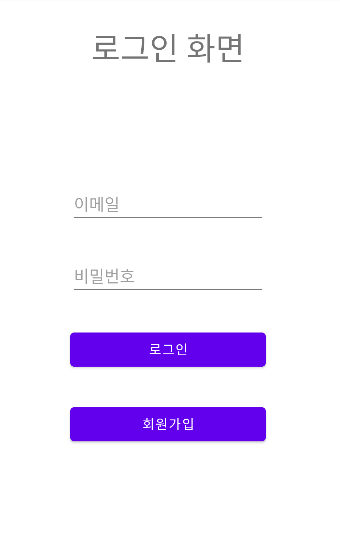
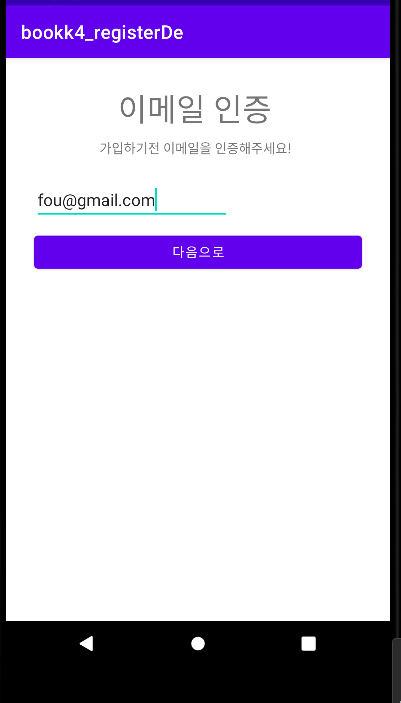
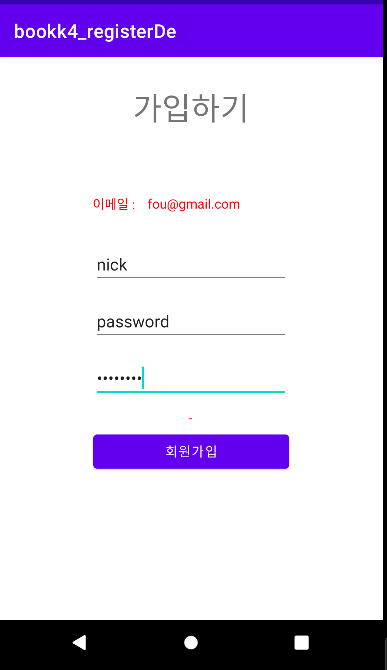
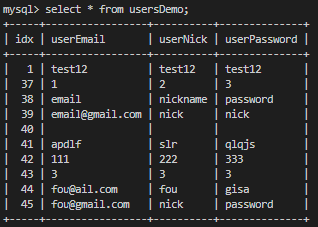
아래와 같이 데이터베이스에 정보가 삽입된 것을 볼 수 있다.
로그인화면에서 입력된 정보를 가지고 로그인을 해보면 사진과 같이 정상적으로 작동함을 볼 수 있다.